Live Wedding & Event Streaming to Selected Rooms
For resorts and event properties: take a live feed from a function and make it available on the TVs in a selected set of rooms. This page walks through how an event becomes a channel, what equipment and network it needs, how staff pick the rooms (and keep unrelated guests out), and the setup lead time and support model.
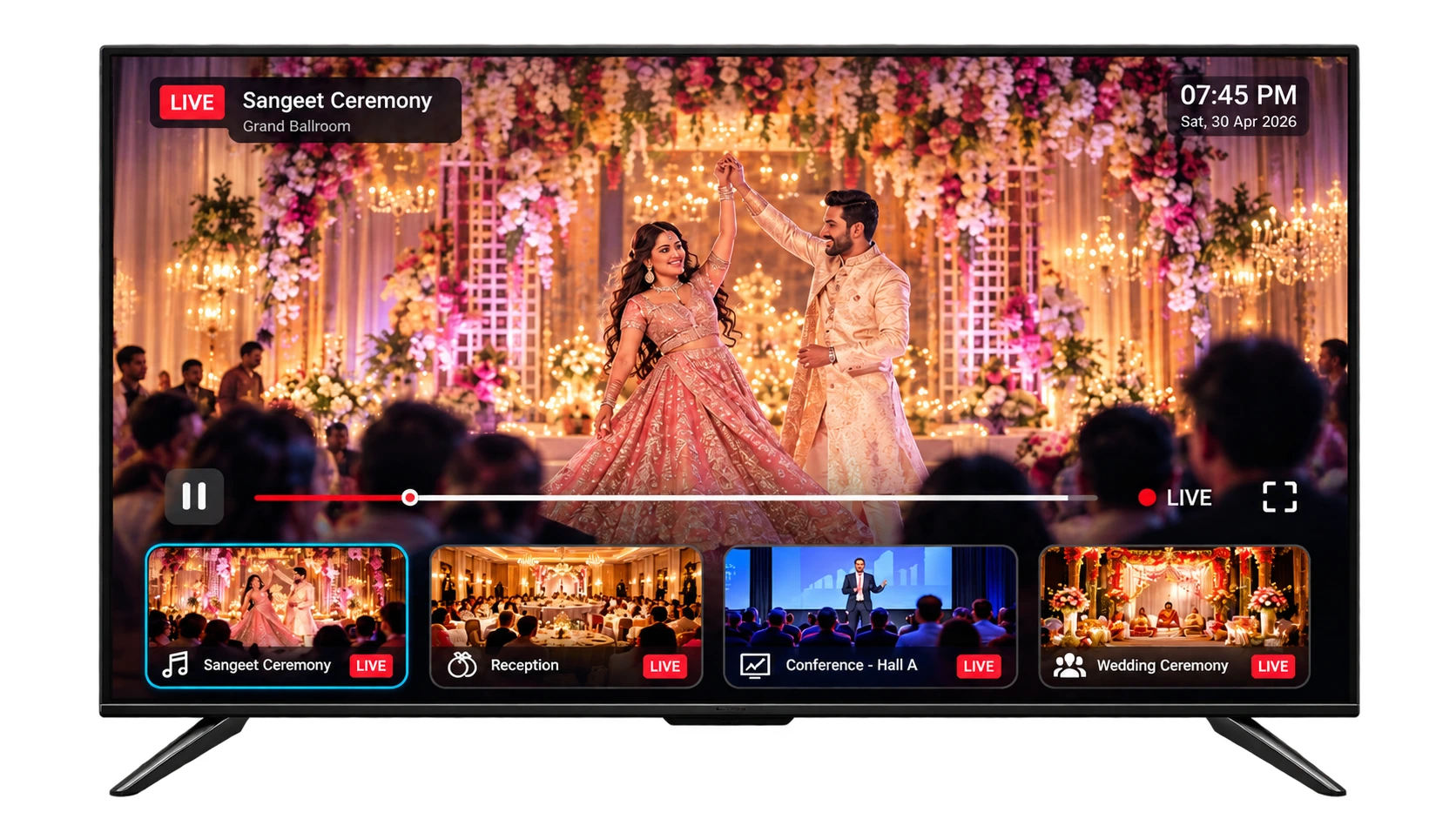
A live event feed, delivered to the exact rooms you choose — families follow a reception from their room, delegates watch a keynote without crowding the hall, and no unrelated guest sees it.
How an event reaches the rooms
An on-site event is turned into a channel that selected room TVs can show. At a high level:
- A live feed is captured from the function (for example a wedding or a conference hall).
- That feed is published as an event channel within Grooviz.
- Authorised staff assign the channel to a chosen set of rooms, and those room TVs can show the event.
What actually changes
A live event feed — broadcast
The wedding, conference or keynote is streamed live to the selected rooms.
Exact rooms — chosen by staff
Staff pick which rooms receive the event; unrelated guests never see it.
No crowding, no disruption
Families and delegates watch from their rooms instead of filling the venue.
A live event delivered to selected guest rooms, controlled from the staff dashboard.
Feed, equipment & who operates it
The capture side depends on the event, so the exact kit and who runs it are agreed per event rather than assumed.
- The camera/event feed and any encoder or additional equipment are specified for the specific event.
- Whether your team, your AV vendor, or Grooviz supplies and operates that equipment is agreed up front.
- We confirm the feed format and hand-off point so there’s no ambiguity on the day.
Network requirements
Live event streaming to multiple rooms is bandwidth-dependent, so the property network is part of the plan.
- Sufficient bandwidth and in-room coverage are needed for the rooms receiving the event.
- Wired Ethernet to the devices is preferred for a stable broadcast; Wi-Fi is supported.
- Capacity for the expected number of rooms is checked ahead of the event rather than on the day.
Choosing rooms & keeping others out
Authorised staff only
Only authorised staff can assign an event channel to rooms, from the dashboard.
Select the rooms
Staff choose exactly which rooms receive the event — for example the wedding party’s block.
Unrelated rooms excluded
Rooms not selected do not receive the event channel, so unrelated guests never see it.
Stop when it ends
When the event finishes, the channel is removed from those rooms.
Central vs. in-room: The event channel and room assignment are controlled centrally by authorised staff; the only on-site variable is the capture feed and equipment for that event.
Lead time, support & charges
An event broadcast is a scheduled activity, so timing and responsibilities are set in advance.
- Setup lead time is agreed so the feed and rooms are ready before the event starts.
- Support responsibility during the event (who is on hand if something needs attention) is defined up front.
- Any additional charges for equipment, operation or event support are confirmed in advance — not assumed to be included.
A real example
A destination-wedding resort streaming a sangeet and reception to the family’s room block:
- Elderly relatives and guests with young children follow the ceremony from their rooms.
- Only the wedding party’s rooms receive the channel; other guests’ TVs are unaffected.
- The feed is set up ahead of time and removed once the event ends.
Exact scope, equipment and commercial terms are confirmed when we discuss your event requirements.
Common questions
Which rooms can see the event?
Only the rooms authorised staff select. The event channel is assigned to a chosen set of rooms, and rooms that aren’t selected never receive it.
Who supplies the camera and encoder?
That depends on the event. The feed source and any encoder or additional equipment — and whether your team, your AV vendor or Grooviz operates them — are agreed per event.
What does the network need to handle?
Enough bandwidth and in-room coverage for the rooms receiving the event. Wired Ethernet is preferred; Wi-Fi is supported. We check capacity before the event.
How far in advance do we need to set it up?
A setup lead time is agreed so the feed and rooms are ready before the event. Support responsibility and any additional charges are confirmed in advance.
Planning an event broadcast?
Tell us about the event — venue, feed source and which rooms should receive it — and we’ll confirm the equipment, network, lead time, support and any additional charges for your property.
Discuss Event RequirementsExplore all features
SMART TV
Smart TV Conversion
Learn morePRIVACY
Automatic OTT Logout for Hotel TVs
Learn moreSTREAMING
Live TV, IP TV & OTT Streaming
Learn moreAI
Multi-Lingual AI Concierge & Chatbot
Learn moreFOOD
In-Room Food & Service Ordering
Learn moreEVENTS
Live Wedding & Event Streaming to Selected Rooms
Current pageOPERATIONS
Central Admin Dashboard & Staff Tools
Learn moreGUEST PASS
Self Check-In with GuestPass
Learn moreReady to see it on your TVs?
Upgrade every room screen with no hardware replacement. Talk to our team for a tailored walkthrough.
Get in touch