In-Room Food & Service Ordering
A direct line between the guest screen and your service teams. Guests browse menus and place food, housekeeping and amenity requests; each request is routed to the right department, moved through accept-to-complete, and reflected back to the guest. Orders stay in-house — they go to your teams through the Grooviz staff tools, not to any outside delivery platform.
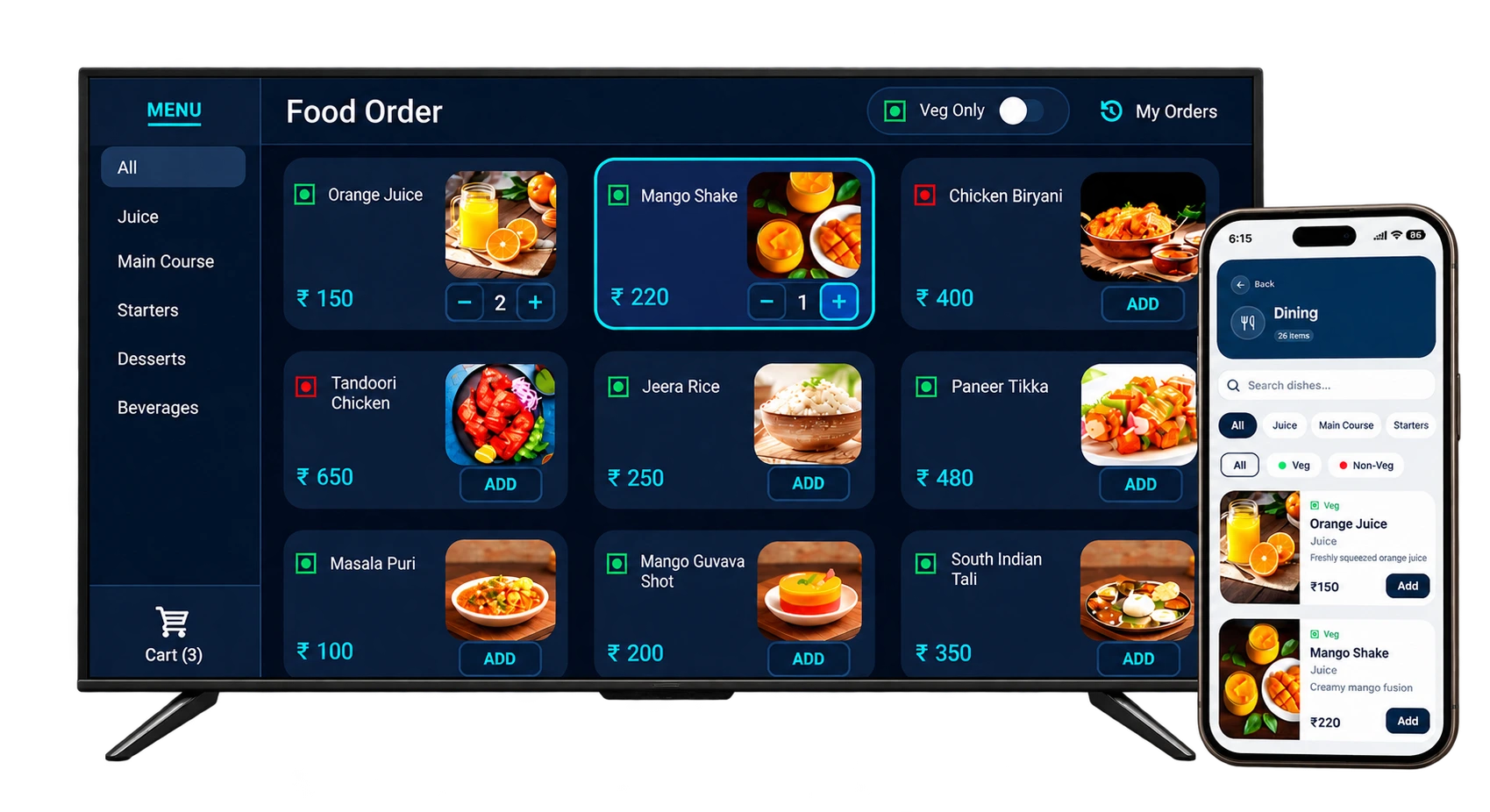
Guests request; the right department responds. Food and service orders route to your own kitchen, housekeeping and reception teams through the Grooviz staff tools — with no third-party delivery apps involved.
What guests can request
From the supported screens, guests do more than order dinner — the same flow covers service requests too.
- Browse menus, add items to a cart and place food & beverage orders from the room TV or their phone browser.
- Raise housekeeping requests (towels, cleaning) and amenity requests without calling the front desk.
- See their order and request history for the stay, so repeat requests are quick.
- No app download — the guest uses the TV or scans to continue in their phone browser.
What actually changes
The phone call — replaced
Guests order from the TV or their phone; no call to the front desk needed.
Orders routed to the right team
Food goes to the kitchen, housekeeping requests to housekeeping — automatically.
Third-party delivery — not involved
Orders go to your own teams, keeping revenue and service in-house.
Guests browse and order from their room TV; orders route directly to your kitchen and staff.
How a request reaches the right team
Every request is routed to the department that owns it, with role-based access so each team sees only what’s relevant.
- Food orders route to the kitchen; housekeeping and amenity requests to housekeeping; general requests to reception.
- Role-based access and department routing keep each team’s queue focused.
- Cross-department escalation means a request that stalls can be moved on rather than lost.
Staff response & guest status
Requests move through a clear lifecycle, and the guest sees progress rather than wondering whether anyone received it.
- Staff acknowledge, then accept or reject a request, move it through preparation, and mark it complete.
- Status updates and order tickets (KOT) sync back to the central dashboard in real time.
- Guests see live progress and updates on their order while the screen is open.
Handling the exceptions
Unavailable items
Items you mark unavailable stop being orderable, so guests don’t order what the kitchen can’t make.
Order changes
Changes before acceptance are handled in the staff tools; your team controls what’s accepted.
Cancellations
A request can be rejected or cancelled with the status reflected back to the guest.
Unanswered requests
Requests that aren’t picked up can be escalated across departments so nothing is silently dropped.
Central vs. in-room: Menus, pricing, availability and promotions are managed centrally in the dashboard; the per-request work happens in your teams’ staff tools, synced in real time.
Billing & fulfilment
Fulfilment runs through your own teams. Billing options depend on your setup, so we confirm them per property rather than claiming every method is available everywhere.
- Orders are fulfilled by your own kitchen and service teams — there is no third-party delivery platform in the loop.
- Kitchen tickets (KOT) are generated for food orders so the kitchen works from a clear ticket.
- Payment, room-charge and POS handling are confirmed per property; where a capability isn’t supported for your setup, we say so rather than imply it.
Why operators adopt it
The benefit is operational control and fewer phone calls — described in concrete terms, without invented savings figures.
- You update menu prices, availability and promotions yourself, centrally — changes apply across rooms without reprinting anything.
- Requests arrive as structured tickets to the right team instead of as phone calls to transcribe.
- A workflow demo shows the actual staff screen alongside the guest screen so you can judge the fit before committing.
Any efficiency or revenue numbers are only shared where backed by measured deployment evidence for a comparable property.
Common questions
Does Grooviz use third-party food delivery apps?
No. Orders go to your own kitchen and service teams through the Grooviz staff tools — there is no third-party delivery platform involved. This keeps in-room dining under your control and fulfilled by your staff.
What can guests request besides food?
Housekeeping and amenity requests as well — towels, cleaning and similar — from the same TV or phone flow, with no app download.
How do requests reach our teams?
They’re routed by department: food to the kitchen, housekeeping/amenities to housekeeping, general requests to reception, with role-based access and cross-department escalation.
Can guests see the status of their order?
Yes. Staff move each request through accept, prepare and complete; status updates sync to the dashboard and progress is reflected back to the guest.
How is it billed?
Fulfilment is by your own teams, and kitchen tickets are generated for food orders. Payment, room-charge and POS options are confirmed per property — we state what’s supported for your setup rather than assume all methods are available.
How do we update menus and prices?
You manage menu items, pricing, availability and promotions centrally in the admin dashboard; changes apply across rooms without per-room edits.
See the guest and staff screens together
Book a workflow demo to see a request move from the guest screen to the right department and back — plus how your team updates menus, prices and availability, and which billing options are supported for your property.
Book a Guest Ordering Workflow DemoExplore all features
SMART TV
Smart TV Conversion
Learn morePRIVACY
Automatic OTT Logout for Hotel TVs
Learn moreSTREAMING
Live TV, IP TV & OTT Streaming
Learn moreAI
Multi-Lingual AI Concierge & Chatbot
Learn moreFOOD
In-Room Food & Service Ordering
Current pageEVENTS
Live Wedding & Event Streaming to Selected Rooms
Learn moreOPERATIONS
Central Admin Dashboard & Staff Tools
Learn moreGUEST PASS
Self Check-In with GuestPass
Learn moreReady to see it on your TVs?
Upgrade every room screen with no hardware replacement. Talk to our team for a tailored walkthrough.
Get in touch