Live TV, IP TV & OTT Streaming
Live TV and OTT on the same screen, with a clear line between what the property provides and what the guest brings. This page separates free-to-air channels, paid channel packages and guest-owned OTT subscriptions, and explains availability, network responsibilities and how to trial it alongside your current TV arrangement.
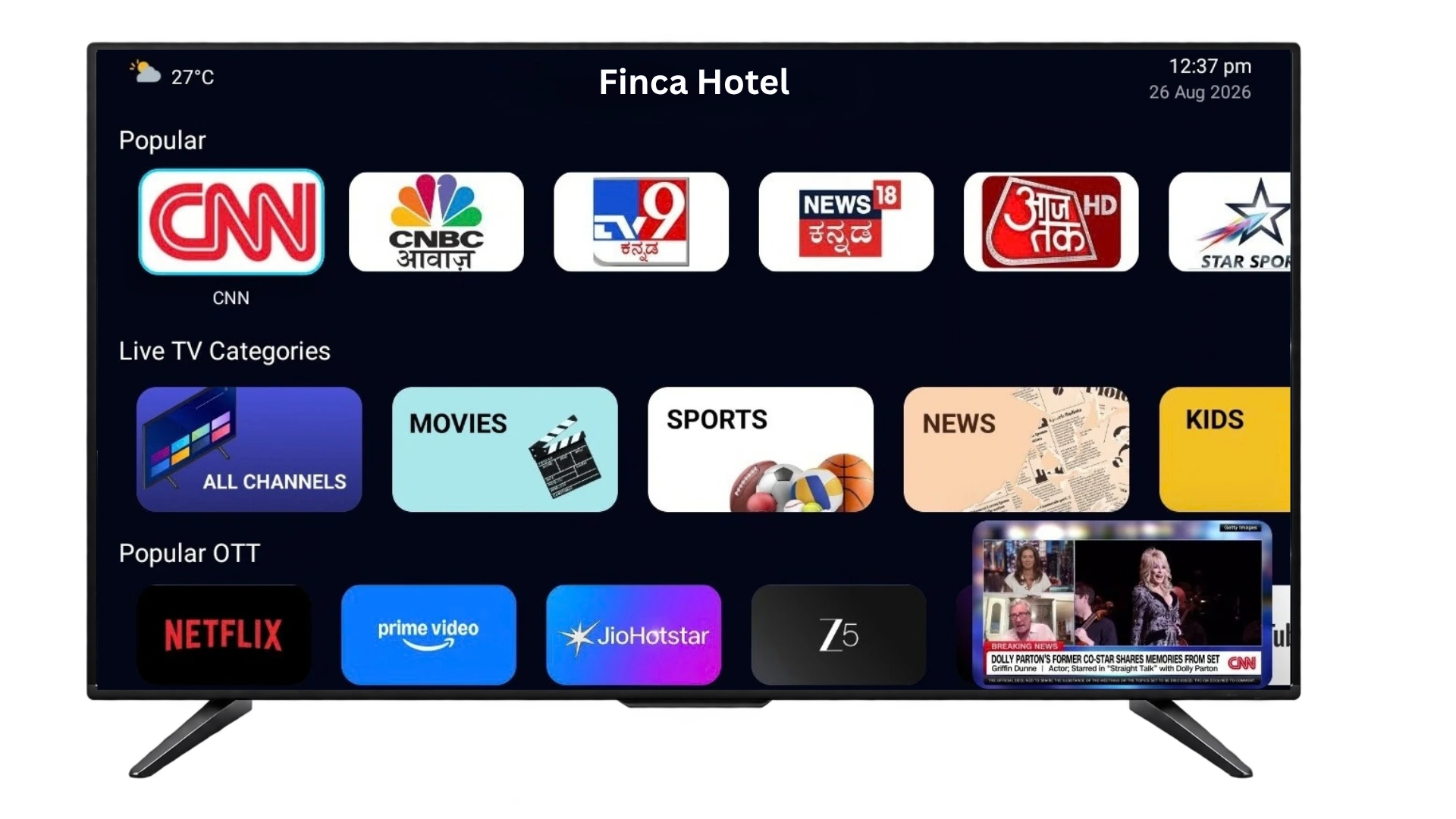
A combined live-TV and OTT experience: 200+ channels provided by the property, plus the streaming apps guests already subscribe to — with the exact package confirmed for your property.
What’s included — and who provides what
The headline "200+ channels" is a capability, not a single fixed bundle. Your actual lineup is confirmed per property. There are three distinct layers:
- Free-to-air & IP TV channels — the core live-TV lineup Grooviz delivers to the room, including free-to-air and IP TV satellite channels.
- Paid channel packages — premium or add-on channel tiers that carry a cost; these are quoted separately and are not assumed to be part of the base lineup.
- Guest-owned OTT subscriptions — apps such as Netflix, YouTube and Prime Video, which guests sign into with their own accounts. Grooviz provides the access on the TV; the subscription stays the guest’s.
Because the homepage lists a paid IPTV option, we keep the relationship explicit: the base live-TV lineup, any paid channel package, and guest OTT logins are three separate things. Your published package defines exactly which channels a room receives.
What actually changes
Your existing TV — kept
No hardware swap. 200+ channels arrive over the Grooviz device already on the TV.
Live TV & IP TV — delivered
A full channel lineup, managed from the dashboard and updated centrally.
Guest OTT apps — unlocked
Guests sign into Netflix, YouTube and more with their own accounts, then log out at checkout.
Live TV channels and guest streaming apps on one room TV, centrally managed.
Availability & regional channels
Channel availability depends on your location and licensing, so it is confirmed per property rather than promised as a universal list.
- Supported countries and regional/language channels are confirmed for your property during the channel assessment.
- The exact lineup can vary by property based on region, licensing and the package selected.
- OTT app availability follows what each app supports in your region and on the device.
Network, bandwidth & responsibilities
Live TV and OTT are bandwidth-dependent, so the property network matters as much as the software. Responsibilities are split clearly:
- Grooviz — delivers the channel lineup and the on-TV experience, and manages it centrally from the dashboard.
- The property — provides sufficient internet bandwidth and in-room network coverage (wired Ethernet recommended, Wi-Fi supported) for simultaneous streaming across upgraded rooms.
- Content/OTT providers — own their apps, content catalogues and the guest’s own subscription; regional availability follows their terms.
- Capacity and coverage are checked in the assessment so gaps are addressed before go-live.
Running it alongside your current TV setup
Keep your current arrangement
During a pilot, your existing television arrangement can continue to run so there is no disruption to live rooms.
Enable Grooviz on pilot rooms
Grooviz live TV and OTT are switched on for a selected set of rooms via the dashboard.
Compare side by side
Validate channel lineup, streaming quality and the guest experience against your current setup.
Transition when ready
Expand to more rooms once the lineup and performance are confirmed for your property.
Central vs. in-room: The channel lineup, packages and app availability are configured centrally; the per-room work is the device connection and confirming network coverage for streaming.
OTT apps, guest subscriptions & devices
Guests use the streaming apps they already pay for; the property is not reselling those subscriptions.
- Supported OTT apps and the specific device requirements are confirmed per deployment.
- Guests sign in with their own OTT accounts, so an active personal subscription is needed for paid apps.
- At checkout, guest OTT sessions are cleared so the next guest starts fresh (see Automatic OTT Logout).
Trial it before you commit
You can validate the live-TV and OTT experience on a few rooms first.
- Begin with a channel and compatibility assessment for your property and region.
- Pilot live TV + OTT on selected rooms, optionally alongside your current arrangement.
- Confirm the final package and expand across the property.
The exact channel package, paid add-ons and commercial terms are confirmed with your team during the assessment.
Common questions
Is "200+ channels" a fixed bundle?
No. It describes the live-TV capability. Your actual lineup — free-to-air plus any paid channel package — is confirmed and published per property, because availability depends on region and licensing.
What’s the difference between the channels and the OTT apps?
Channels (free-to-air and IP TV) are provided to the room by the property via Grooviz. OTT apps like Netflix or YouTube use the guest’s own subscription — Grooviz provides the access on the TV, the account stays the guest’s.
Do guests need their own streaming subscriptions?
For paid OTT apps, yes — guests sign in with their own accounts, so an active personal subscription is required. Supported apps and device requirements are confirmed per deployment.
What bandwidth is required and who provides it?
Live TV and OTT need sufficient internet bandwidth and in-room coverage, which the property provides (wired Ethernet recommended, Wi-Fi supported). Grooviz delivers the lineup and experience; OTT providers own their apps and content. We assess capacity before go-live.
Can it run alongside our existing TV setup during a pilot?
Yes. During a pilot, your current television arrangement can keep running while Grooviz is enabled on selected rooms, so you can compare before transitioning.
Want your exact channel package?
Get a channel and compatibility assessment for your property and region — the confirmed free-to-air lineup, any paid channel packages, supported OTT apps and the network you’ll need.
Channel & Compatibility AssessmentExplore all features
SMART TV
Smart TV Conversion
Learn morePRIVACY
Automatic OTT Logout for Hotel TVs
Learn moreSTREAMING
Live TV, IP TV & OTT Streaming
Current pageAI
Multi-Lingual AI Concierge & Chatbot
Learn moreFOOD
In-Room Food & Service Ordering
Learn moreEVENTS
Live Wedding & Event Streaming to Selected Rooms
Learn moreOPERATIONS
Central Admin Dashboard & Staff Tools
Learn moreGUEST PASS
Self Check-In with GuestPass
Learn moreReady to see it on your TVs?
Upgrade every room screen with no hardware replacement. Talk to our team for a tailored walkthrough.
Get in touch